


- What Is Internet Privacy?
- Common Online Privacy Concerns and Risks to Be Aware Of
- Online Privacy Protection: How to Protect Your Privacy Online
- Tip 1: Use good third-party tools to protect your browser
- Tip 2: Protect your IoT devices
- Tip 3: Block browsers from tracking you
- Tip 4: Browse online with a secure VPN
- Tip 5: Update your software regularly
- Tip 6: Block targeted ads and data tracking
- Tip 7: Remove unnecessary third-party app connections
- Tip 8: Be careful about what you share online
- What You Need to Know about Online Privacy Laws and Regulations
- How These Digital Privacy Laws Protect You
- What Companies Are Required to Do about Your Personal Data
- Insights from Recent Studies on Public Concern over Data Privacy
- Why Is Online Privacy Important?
- Secure Your Online Privacy the Right Way
- FAQ
Internet privacy is a serious issue we need to take a good look at. It involves various layers of security, legal, and ethical considerations, which can be quite complex for some people.
And I get them because it’s not just about preventing apps from accessing your location. It’s also about navigating privacy policies and understanding what information your phone, GPS, PC, and the sites you visit are collecting from you.
For example, the U.S. Federal Trade Commission published a report of how the biggest platforms like Facebook (Meta), Discord, WhatsApp, and many others collect extensive personal data, like your education and income.
Other reports find that these platforms even collect private messages. And they do a worse job of protecting minors. This guide will explore what you need to know about internet privacy and how to protect your privacy online.
What Is Internet Privacy?
Internet privacy (also called digital or online privacy) is all about how you control what personal information and how much of it third parties can collect and use when online. In simple terms, you decide what to share and what to keep private when browsing.
When you’re on your favorite social media platform and scrolling through countless videos, companies use ads or data collection to watch you.
Normally, you should consent to this, but in some cases (or most cases), it happens without your knowledge. That’s why you need to protect your personal data.
But what exactly is personal data?
Personal data refers to any information that can identify an individual. The General Data Protection Regulation (GDPR) defines it as “ any information that relates to an identified or identifiable living individual.”
Basically, any piece of information that, when collected, can identify who you are counts as personal data or information.
Digital privacy is the way websites, applications, and platforms online store, use, and treat your personal information. However, online security is how you protect yourself online from cyber threats .
For example, if you limit who can see your Instagram posts to only those you’ve accepted as friends, you are managing your online privacy. Online security comes in when you set a two-factor authentication on that app. However, they work together to protect your digital presence.
Common Online Privacy Concerns and Risks to Be Aware Of
Every time you go online, you dive into dangerous waters. So it’s important to know how to protect your identity online. Here are some of the most common internet privacy issues people go through:
- Data breaches. Unauthorized individuals can get access to your sensitive information and use it for criminal purposes. The aftermath of these breaches can be devastating for both individuals and organizations, like T-Mobile’s multiple data breaches that affected millions of customers. Their social security numbers, addresses, and names were all affected. Yikes!
- Online surveillance. Your activities online are not as private as you think. Governments, corporations, and other entities can compromise your online privacy and security by monitoring your online behavior and communications.
- Scams and phishing attacks. Criminals can use deceptive tactics to trick you into disclosing sensitive information, such as your credit card details or passwords. They are often designed to look legitimate, which can be hard to detect. And in the era of AI, it’s bound to evolve and get worse.
- Tracking and profiling. Have you noticed ads that seem to follow you on every site you visit? That’s tracking and profiling in action. Businesses can use cookies and these tracking technologies to monitor your online behavior and throw targeted ads at you.
- Insecure Wi-Fi networks. Public Wi-Fi networks in hotels, cafes, or airports are so insecure. Hackers can intercept the data you transmit over these networks and access your login credentials or even bank accounts.
- Internet of Things (IoT) vulnerabilities. IoT devices, like wearables, are really convenient, but they also come with privacy risks. Most of these devices have weak security measures, which hackers can exploit. A good example is the Mirai botnet attack that took control of poorly secured IoT devices. The hackers used it to launch a DDoS attack on Dyn, which took CNN, Netflix, and Twitter offline.
- Lack of transparency. Most online platforms and services bury crucial information about data collection and sharing in lengthy and hard-to-understand terms of service agreements. This makes it difficult to know how they use or share your personal data.
- Problems with AI tracking. Tracking done by artificial intelligence is pushing privacy concerns into uncharted territory. Algorithms now have the ability to learn your online behavior. For example, AI-driven systems can monitor your browsing history to predict future searches or purchases. It can even track your movements and habits in real time using your location data.
- Downsides of biometric technology. Biometric techs like facial recognition and fingerprint sensors provide an easy way to unlock your phone, but they also introduce serious risks if mishandled. For example, if hackers breach a company that stores your biometric data, they could use it to bypass security systems because, unlike passwords, you can’t change your fingerprint or face.
Online Privacy Protection: How to Protect Your Privacy Online
Since your personal data is constantly at risk, you need to take proactive measures to protect your privacy online. Let’s break down effective online privacy protection strategies to reduce the exposure of your personal data.
Tip 1: Use good third-party tools to protect your browser
Using third-party tools is one of the most effective ways to secure your privacy when browsing online. For example, browsers that are focused on privacy, like Brave, or extensions such as uBlock Origin and Privacy Badger, can:
- Block tracking cookies.
- Prevent ads from following you.
- Dramatically reduce your chances of being hacked or tracked.
- Safeguard your data from malicious websites.
- Block AI and machine learning algorithms.
Even though Google Chrome, Firefox, and Microsoft Edge provide some level of protection, third-party tools go further to offer more robust, customizable features.
Among its numerous features is Browser Protection.
It protects your browser from illegal changes by learning browsing data after each web session, checking downloads for potential threats, and preventing unnecessary settings changes.
Here’s a table comparing some of the best tools you should consider:
| Tools | Key features | Pros/Cons | Price | Available on | Where to download |
|---|---|---|---|---|---|
| uBlock Origin |
|
Pros:
Cons:
|
Free | Chrome, Firefox, Edge, Opera (extensions) | Browser’s extension store (e.g., Chrome) |
| Privacy Badger |
|
Pros:
Cons:
|
Free | Chrome, Firefox, Edge, Opera (extensions) | Browser’s extension store |
| Ghostery |
|
Pros:
Cons:
|
Free | Windows, Mac, iOS, Android, Chrome, Firefox, Edge, Opera | Ghostery website, Apple App Store, Google Play Store |
| AdGuard |
|
Pros:
Cons:
|
Free with Premium | Windows, Mac, iOS, Android, Chrome, Firefox, Edge, Opera | AdGuard website, Apple App Store, Google Play Store |
| DuckDuckGo Privacy Essentials |
|
Pros:
Cons:
|
Free | iOS, Android (browser app), Chrome, Firefox, Edge (extensions) | Apple App Store, Google Play Store, browser’s extension store |
| NordVPN browser extension |
|
Pros:
Cons:
|
Premium | Chrome, Firefox (extensions), Windows, Mac, iOS, Android (apps) | NordVPN website, Apple App Store, Google Play Store |
| Brave |
|
Pros:
Cons:
|
Free | Windows, Mac, Linux, iOS, Android | Brave website, Apple App Store, Google Play Store |
| Tor Browser |
|
Pros:
Cons:
|
Free | Windows, Mac, Linux, iOS, Android (via Orbot) | Tor Project website, Apple App Store, Google Play Store |
| Firefox (with privacy add-ons) |
|
Pros:
Cons:
|
Free | Windows, Mac, Linux, iOS, Android | Firefox website, Apple App Store, Google Play Store |
Before downloading, take time to read what the tool really does to get the most out of it. For example, Tor doesn’t recommend installing additional plugins or add-ons because they can bypass it and compromise your privacy. Also, make sure the third-party tool you choose can:
- Block trackers that collect data about your browsing habits.
- Prevent ads from displaying or potentially gathering data on you.
- Control or delete cookies.
It’s always important to be cautious. No tool is perfect. So before you use any tool, check if it’s open-source, which means anyone can review its code. Furthermore, take your time and carefully read the privacy policy.
Choose well-reviewed and trusted third-party tools from reputable sources. For example, tools like Auslogics BoostSpeed have earned a good reputation over the years and are trusted by many users.
It’s all about how you balance your privacy needs and the trust you place in these tools. Not all third-party tools are evil. However, if you’re concerned about its intent and usage, don’t use it .
Tip 2: Protect your IoT devices
The Internet of Things combines online security and digital privacy measures to maximize your security. First, secure your network. If you can, use a separate network just for your IoT devices, change the default password on your router, and enable WPA3. Then, turn off features like voice recording or remote access if you’re not using them and regularly update the firmware to fix any security vulnerabilities.
📌 Here’s a detailed guide on securing your IoT devices: How to Secure Your IoT Devices: Best Practices of IoT Home Security
Tip 3: Block browsers from tracking you
One way to reduce the amount of personal data browsers collect is to block them from tracking you. This will prevent you from getting targeted ads and hide sensitive information. Let’s find out how to stop popular browsers from tracking you:
Google Chrome
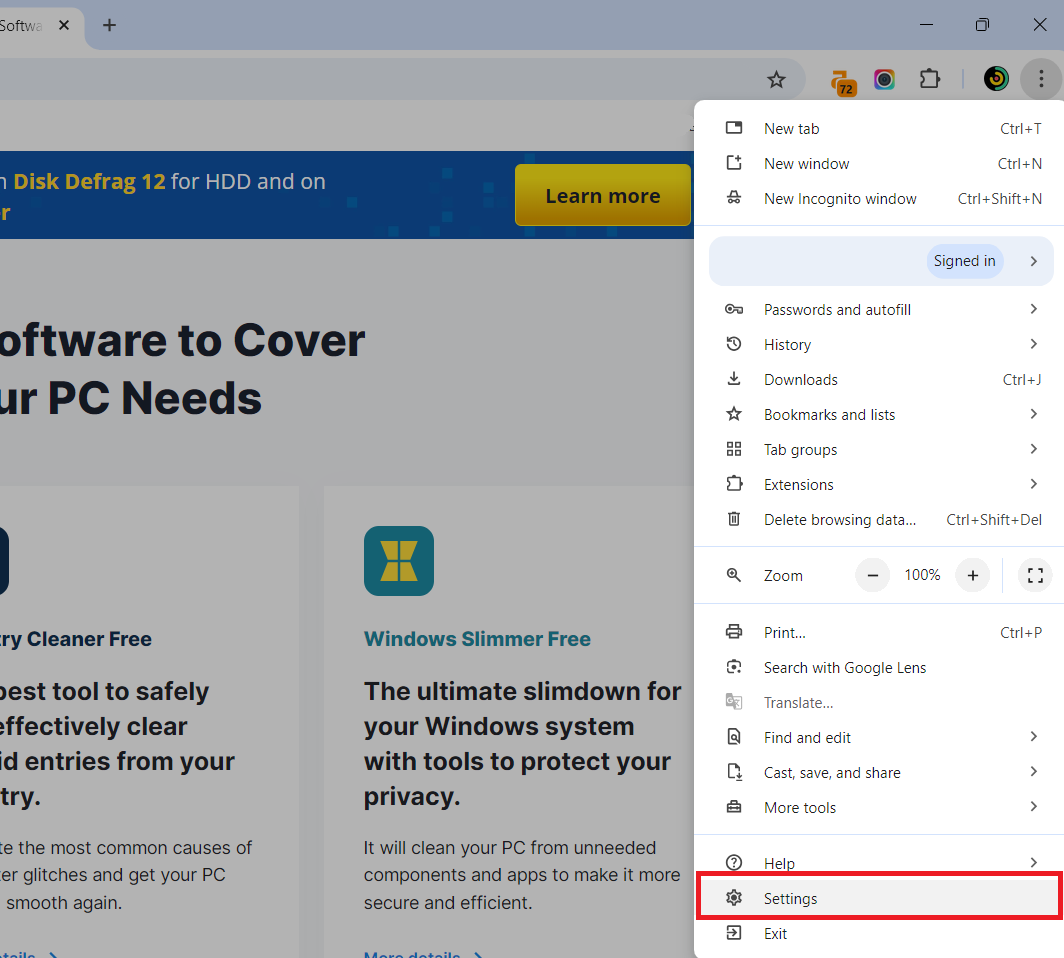
- Launch Chrome, click on the three vertical dots, and select Settings .
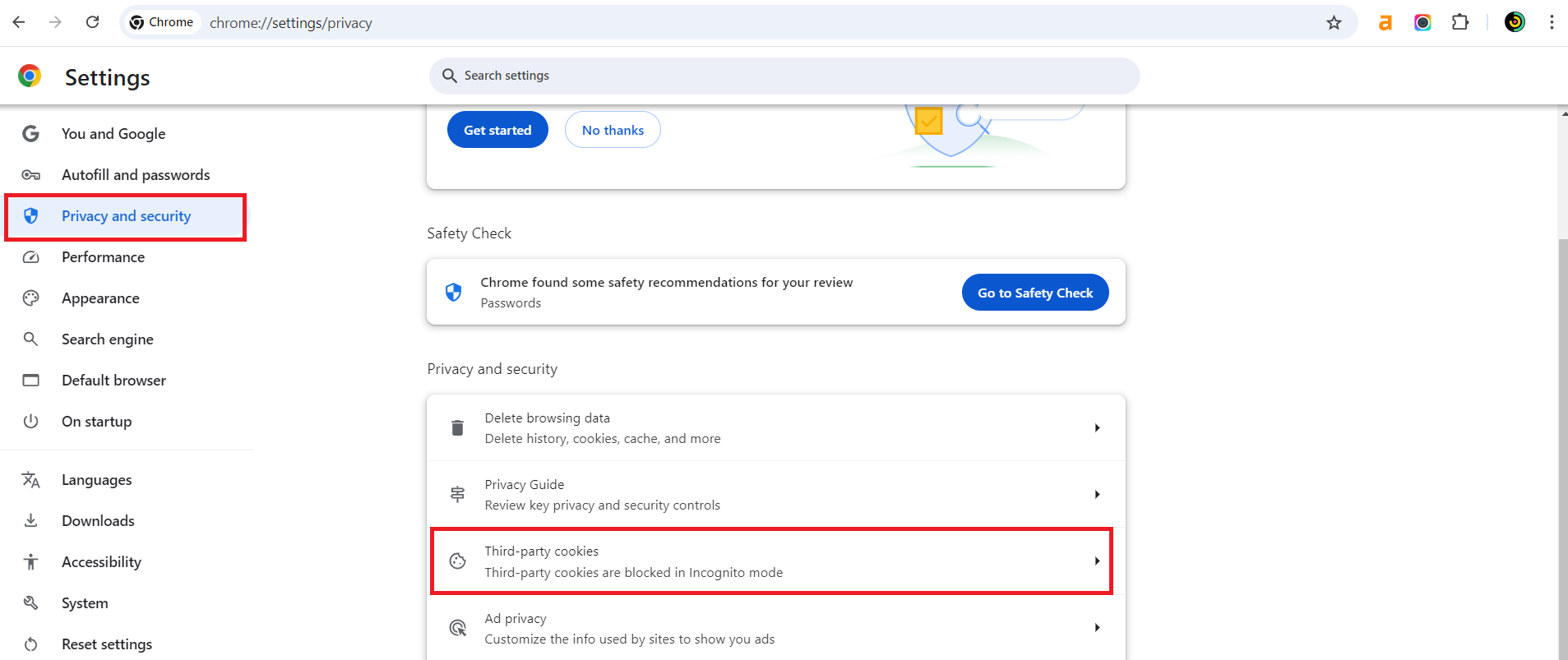
- Select Privacy and security and click on Third-party cookies .
- Toggle the switch beside Send a “Do Not Track” request with your browsing traffic . This will open a prompt menu; go through it and click Confirm .
Microsoft Edge
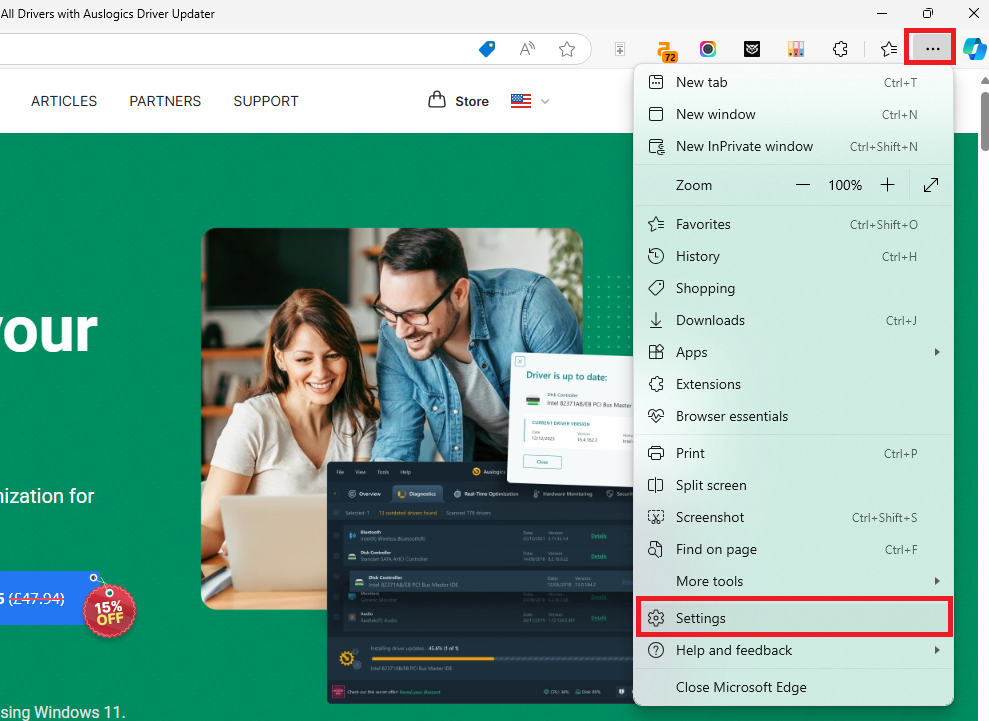
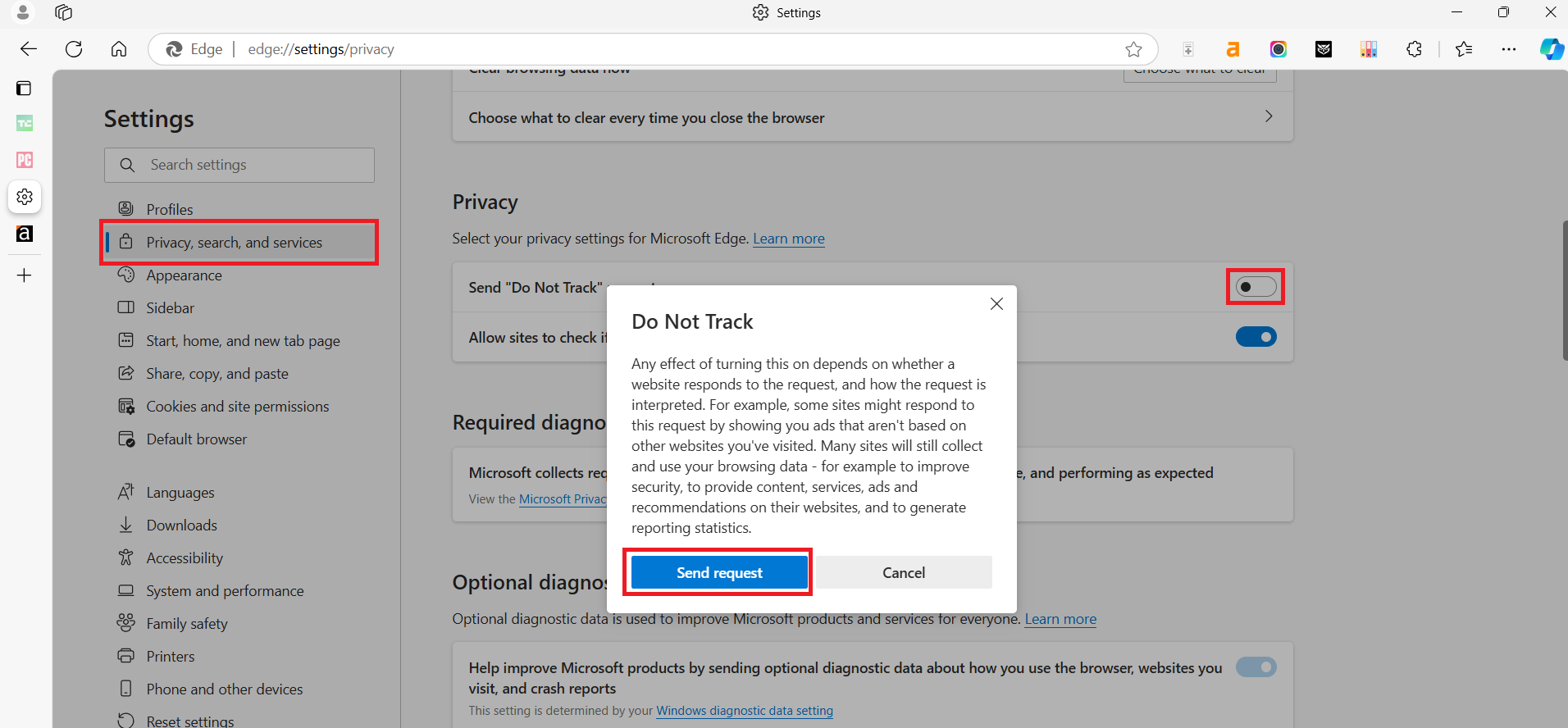
- When you open Edge, click on the three horizontal dots and select Settings .
- Select Privacy, search, and services , scroll down to the Privacy section, and toggle the Send “Do Not Track” requests switch .
- You’ll get a popup window. Carefully read the notice and select Send request.
Tip 4: Browse online with a secure VPN
There are several reasons to start using a VPN as soon as possible, but the most crucial one is boosting your digital privacy protection.
Browsing with a reliable VPN comes with its benefits, such as:
- Traffic encryption.
- Security on public Wi-Fi.
- Protection in high-risk environments.
The most important thing is that a VPN can hide your real IP address and route your internet traffic through a server located in a different geographic location. This provides anonymity, making it challenging for companies and hackers to track your online behavior or trace your activities. Here’s a comparison of the top five VPNs to help you browse securely:
| VPN | Key features | Pros | Cons | Price |
|---|---|---|---|---|
| ExpressVPN |
|
|
|
|
| Surfshark |
|
|
|
|
| CyberGhost |
|
|
|
|
| ProtonVPN |
|
|
|
|
You can get these VPNs on Windows, Mac, Linux, iOS, Android, Chrome, Firefox, and other popular browsers. If you want to install these tools, go to the Google Play Store, Apple App Store, and the browser’s official sites.
Tip 5: Update your software regularly
Software updates often deliver patches that fix security vulnerabilities. When you update your apps regularly, you:
- Apply the latest security measures.
- Reduce the risk of exploitation by cybercriminals.
- Safeguard your system against data breaches.
It’s also important to update your device drivers because hackers can inject malware into your system via outdated drivers.
Tip 6: Block targeted ads and data tracking
When you turn the track off, you limit the amount of your personal data available to advertisers. This reduces the chances of criminals stealing your personal information.
Even though personalized ads seem convenient, they are based on monitoring and analyzing your online behavior. You can keep these targeted ads at bay by adjusting your browser settings.
Here is how you can do that in Google Chrome:
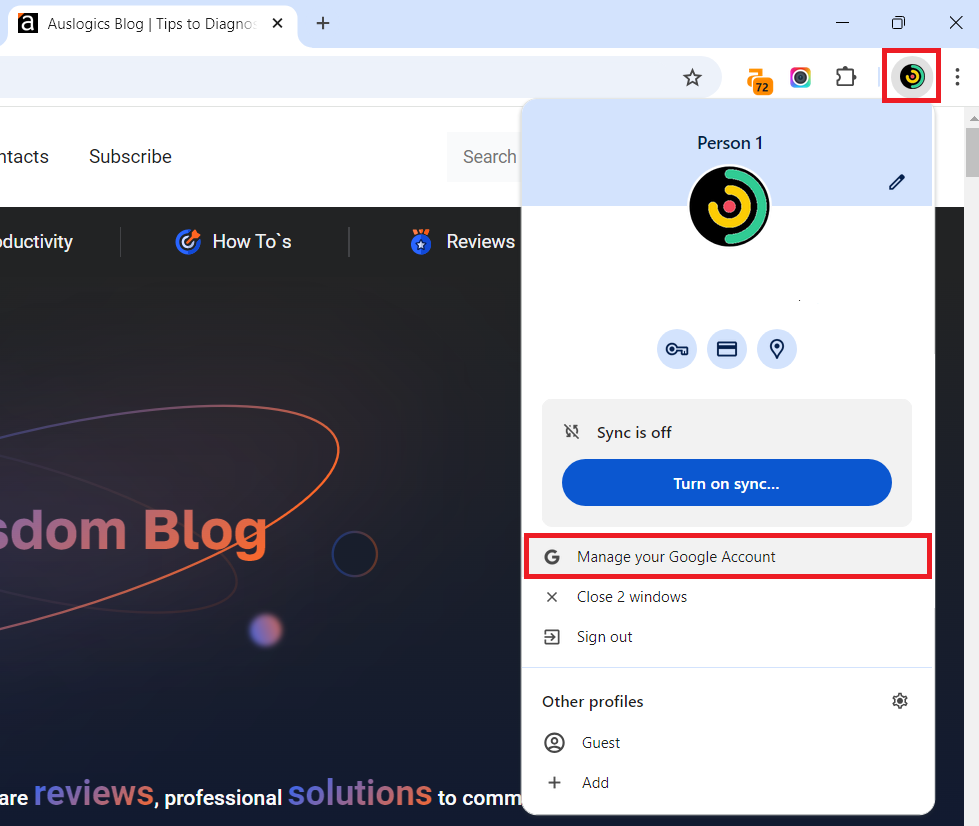
- Log into your account or click your account logo in your browser and select Manage your Google Account .
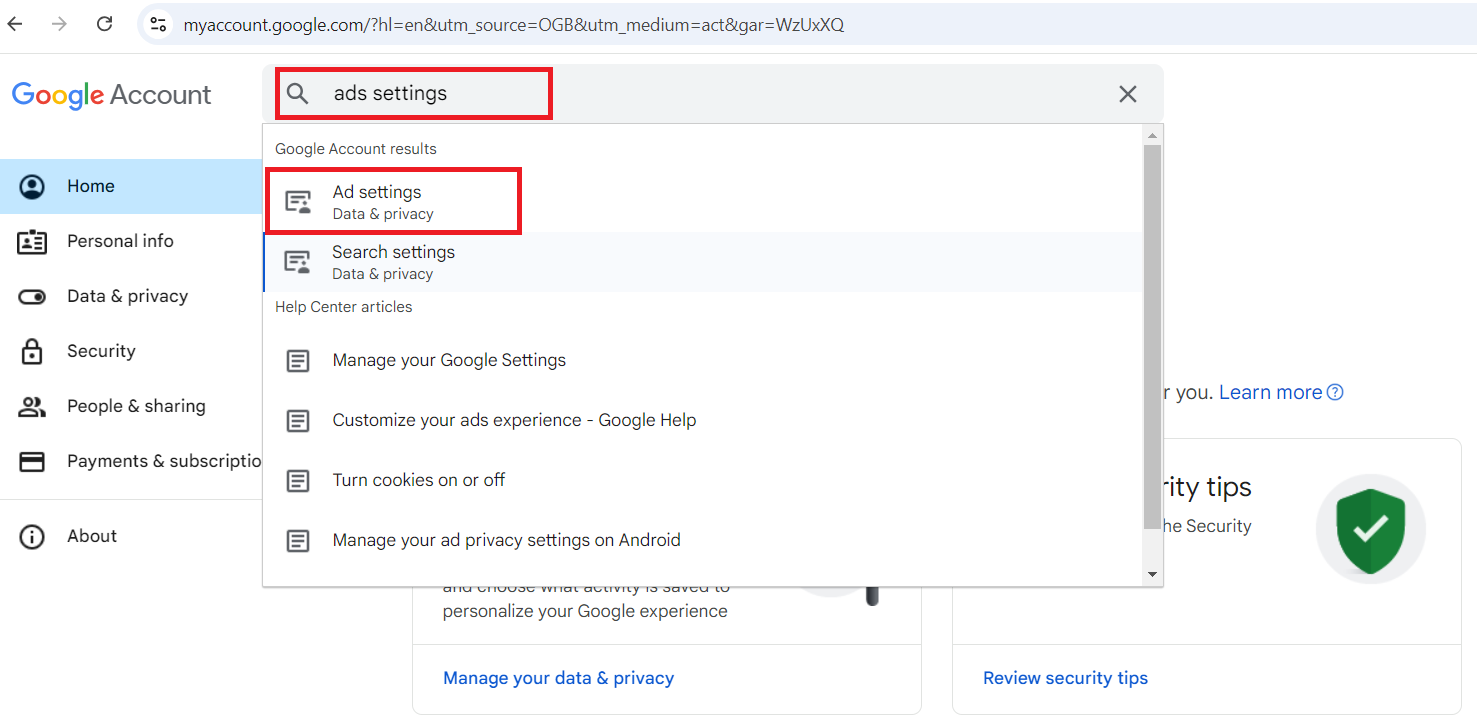
- Type “ads settings” in the search field and press Enter.
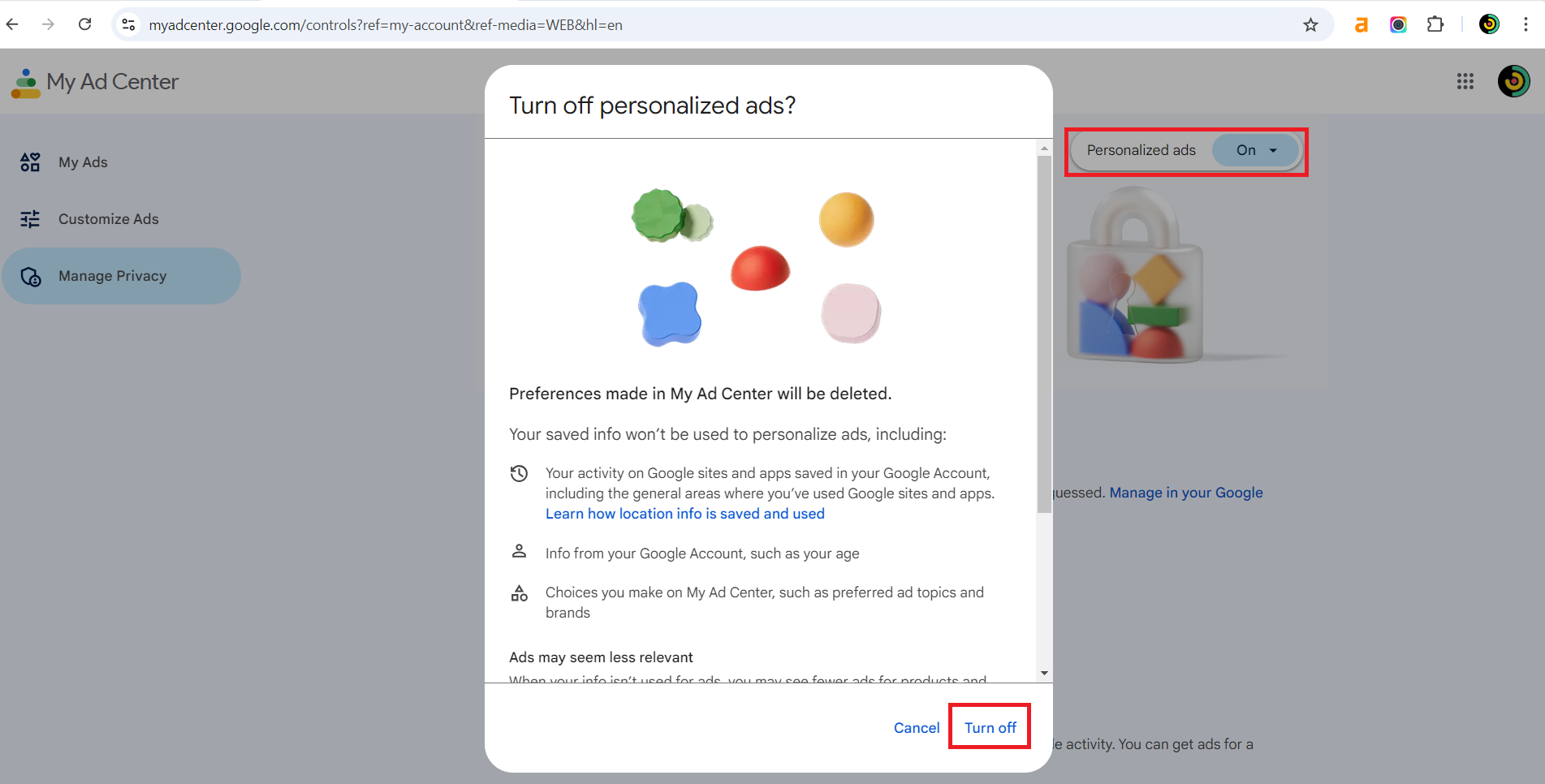
- When the page opens, click on Personalized ads and select Turn off in the new window that opens.
Microsoft Edge
- After opening Edge, click on the three dots at the top right corner and select Settings .
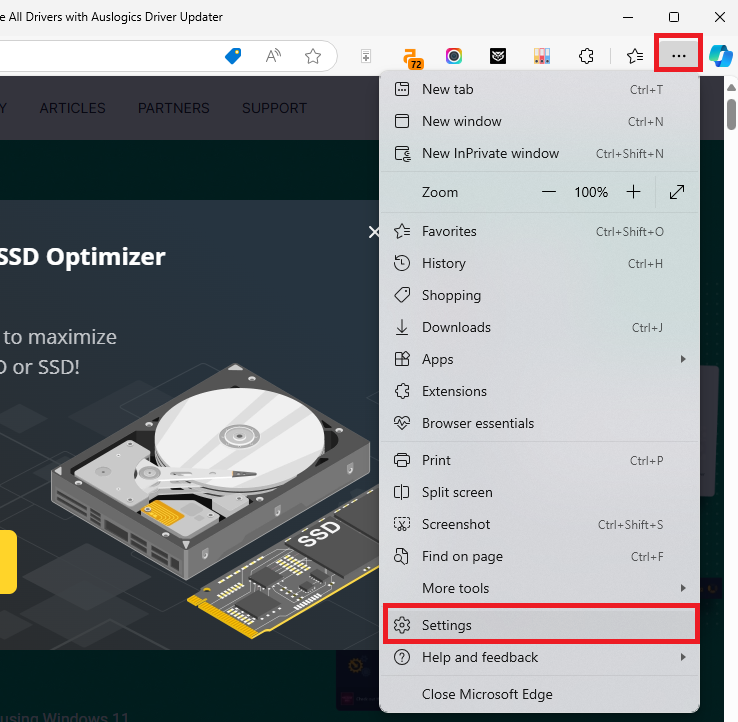
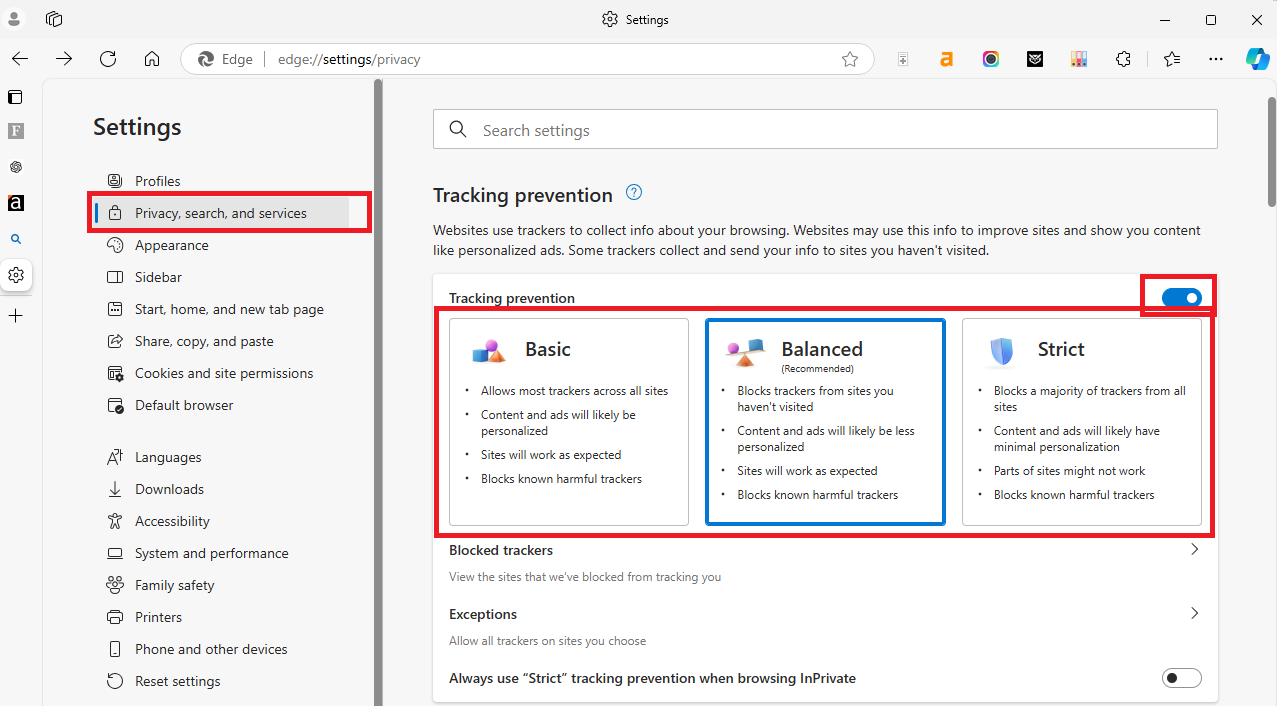
- Click on Privacy, search, and services and toggle the switch beside Tracking prevention.
- Choose your preferred tracking prevention mode: Basic, Balanced, or Strict.
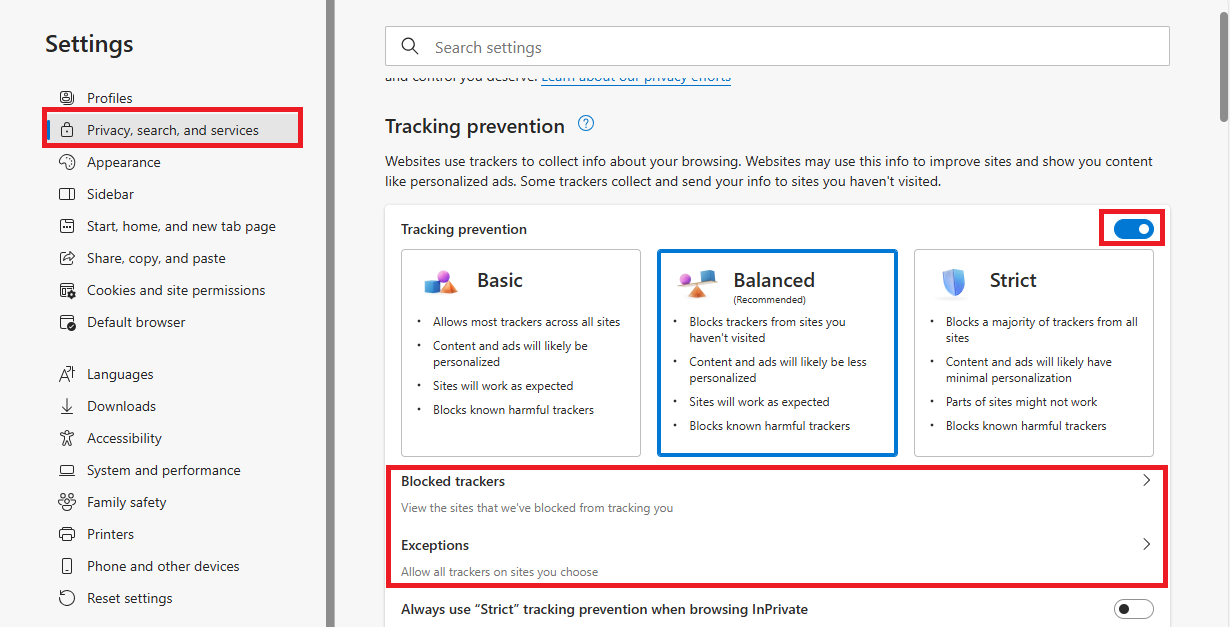
- You can click on Blocked trackers to check the sites Edge has blocked.
- If you want to make exceptions for some websites, click on Exceptions and select Add a site.
How to block targeted ads on Android (Chrome)
- Launch Chrome and click on the three vertical dots.
- Then, tap on Settings.
- Scroll down and select Privacy and security.

- You’ll see Send a “Do Not Track” request switched off by default. Tap on it.
- Toggle to enable the feature.
- Scroll down and enable Always use secure connections so that you get warned when visiting sites that don’t support HTTPS.

How to block targeted ads on Android (Edge)
- Launch the Edge browser and tap on the three horizontal lines at the bottom of the screen.
- Then go to Settings.
- Now, click on Privacy, security and services.

- Scroll down to Security and turn on Tracking prevention, Block ads, and Do Not Track.
Tip 7: Remove unnecessary third-party app connections
Reducing the number of third-party apps on your PC can reduce the data sent to external developers.
Third-party apps usually request access to various types of data on your PC, like location, contacts, or browsing habits. Reduce them, and you’ll be safer online than before.
There are so many ways to go about this:
- Uninstall any third-party apps you don’t use.
- Disable background apps that you don’t need.
- Go to your browser’s extensions and remove or disable extensions that request unnecessary access to your browsing data. You can find that out by clicking on Details when you open a specific browser extension.
- Log into your Microsoft Account and check under Privacy and review any third-party apps linked to your account. You can then remove access to the ones you don’t need anymore.
- Check the app permissions on your phone and disable the ones you don’t need. Just go to Settings and type “app permissions” or “permissions” in the search field.
Tip 8: Be careful about what you share online
You need to pay close attention to what information you share online. For instance, if information like your full name, location, phone number, and frequently visited places gets into the wrong hands, it may lead to ugly consequences.
Fortunately, you can control who can see your posts, pictures, and personal details on social media.
These platforms collect a tremendous amount of personal information. To stay safe, you can go to the privacy settings and restrict who can see your posts, profile, and personal information.
What You Need to Know about Online Privacy Laws and Regulations
When it comes to protecting your online privacy, there are a number of laws and regulations in place to secure your personal data. Let’s go through some of the big internet privacy laws you should be aware of:
1. General Data Protection Regulation (GDPR)—European Union
The GDPR is probably the most popular digital privacy law in the world. This law applies to all companies operating within the EU, including those outside the EU that process the personal data of EU citizens.
The purpose of the GDPR is to give individuals more control over their personal data by making sure businesses act and show transparency and accountability. Here are some key protections under the GDPR:
- The right to know how companies are using your data.
- Strict requirements for businesses to obtain consent to collect and use data.
- The right to access your data.
- The right to erase or correct your data.
Check the full text of the General Data Protection Regulation (GDPR) .
2. California Consumer Privacy Act (CCPA)—United States (California)
Just like the GDPR, the CCPA is a state law that gives California residents rights regarding their personal information. This privacy act was enacted in 2020, and it gives consumers the right to:
- Know what personal data companies collect.
- Refuse the sale of their data.
- Request that their data be deleted.
Even though the CCPA is a state law, it has a widespread impact because businesses across the U.S. need to handle the data of California residents. Here’s a full text of the California Consumer Privacy Act (CCPA) .
3. Personal Information Protection and Electronic Documents Act (PIPEDA)—Canada
PIPEDA governs how private sector organizations in Canada collect, use, and disclose personal information during the course of commercial business. Like the GDPR and CCPA, it makes sure individuals have access to their data and can challenge the accuracy of the information held about them.
Here is the full text of the Personal Information Protection and Electronic Documents Act (PIPEDA) .
How These Digital Privacy Laws Protect You
The laws we just explained above are designed to put the power back into your hands to give you more control over your digital footprint.
Here’s how they safeguard you:
- Increase your transparency. It’s a requirement for businesses to be upfront about how they gather and use your data. You have the right to know the type of information collected, who they share it with, and for what purpose.
- The right to be forgotten. Possibly one of the big protections, especially under the GDPR, is the ability to ask that your personal data should be deleted. If you withdraw consent or the company has no legitimate reason to keep your data, they are required to erase your information.
- Stricter consent requirements. Gone are the days when privacy agreements were vague or hidden. These laws require businesses to get clear consent before collecting data to make sure you’re aware of what you’re agreeing to.
- Right to request and transfer your data. You usually have the right to request a copy of your personal data to see exactly what the company holds on you. You also have the right to request that your data be transferred to another service provider.
What Companies Are Required to Do about Your Personal Data
Besides protecting consumers, the digital privacy laws put clear responsibilities on businesses to force them to take better care of the information they collect.
So, it’s important you know what they are supposed to do. Let’s go through them:
1. Companies must implement strong data security measures
It’s highly crucial for businesses to enforce robust safety protocols to protect your personal data from breachers or hacking. This includes encryption, secure storage systems, and regular security audits.
If there are any data breaches, the company should quickly report them to the authorities and affected individuals.
2. Collect only the necessary data
Businesses should take only the data they truly need. This reduces the risk of data misuse or overcollection and makes sure they’re not holding more personal information than is necessary for their services.
3. Record-keeping and accountability
Many of the online privacy laws require companies to keep detailed records of the data they collect and how they process it. They must be able to show compliance with the regulations and demonstrate that they are taking steps to protect user privacy.
4. Taking care of requests to delete data
If you send a request for a company to delete your data , they must comply with this request. Unless they have a legitimate reason to keep it, like legal or financial reasons. They also need to make it easy for people to make such requests.
5. Appoint data protection officers (DPOs)
Regulations like the GDPR require certain businesses to appoint DPOs who are responsible for ensuring the company’s compliance with privacy laws.
The DPO’s job is to oversee data management practices and serve as a point of contact for both regulators and customers concerned about their data.
Insights from Recent Studies on Public Concern over Data Privacy
Here are some recent insights from studies, public attitudes toward data sharing, and the importance of staying informed about privacy threats:
Studies and surveys over the past years consistently show that people are more concerned about their online privac y.
One key finding shows that many people feel like they have little control over how their data is collected and used. In that same research, 79% of respondents were worried about how businesses used their personal information.
People are now becoming more selective about what they share, especially as stories of data breaches , corporate misuse, and government breaches continue to make headlines.
According to pCloud , Instagram and Facebook are known for collecting personal data and using it for their own benefit.

And 68% of internet users are worried that the government uses their personal information without permission.

Why Is Online Privacy Important?
In the era of artificial intelligence, it’s critical to know how to protect yourself online. Here’s why:
- Protect your personal information. It’s bad news if your personal data, like your financial details, medical records, or even your location, falls into the wrong hands. Cybercriminals can use these details to commit fraud, identity theft, and other harmful things. Protecting your online privacy can minimize risks such as these.
- Secure your digital identity. Every time you engage in the online world, like buying online, you build your digital footprint. The problem? Companies, advertisers, and hackers can use it for targeted advertising, breach security, or influence you politically. Online privacy protection ensures this doesn’t happen.
- Preserve your freedom and autonomy. Digital privacy isn’t just protecting your data; it’s also about having the freedom to make your own decisions without the control of corporations. So, online privacy allows you to express your opinions without fear of surveillance or judgment.
Secure Your Online Privacy the Right Way
It’s clear that the conversation around d igital privac y is more pressing than ever. The more the public concern grows, the more the demand for transparency and stronger protections. No wonder 85% of adults globally want to do more to protect their online privacy. But you can use this article as a step in the right direction. We’ve covered how to protect yourself online and the latest AI threats you need to be aware of. If you have any questions or additions, let us know in the comments below!
FAQ
You can use services like Have I Been Pwned . It tracks data breaches and alerts you if your personal information or email has been exposed.
Also, watch for any unusual account activity, unexpected password resets, or unfamiliar charges on your financial accounts. This may indicate that your data has been compromised.


