 BoostSpeed 13
 Disk Defrag
 Registry Cleaner
 Video Grabber
 Windows Slimmer
 Duplicate File Finder
 Essential Tools
 Registry Defrag
 Driver Updater
 Anti-Malware
 Disk Defrag Ultimate
 File Recovery
 BitReplica
 View all products





How to register Auslogics BoostSpeed Pro?
To activate your copy of Auslogics BoostSpeed Pro, you need to use the license code sent to you via e-mail after the purchase. Here's how to do it:
If you have already installed BoostSpeed Pro:
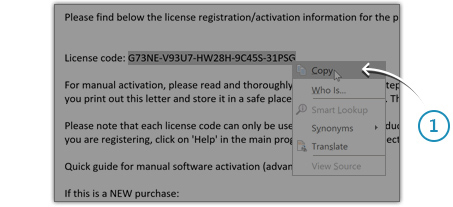
Copy your license code from the order confirmation e-mail
Open your email inbox and find the "Auslogics license information" message for your Auslogics BoostSpeed Pro order. Highlight the license code in the email, right-click on it and choose Copy (fig. 1).

Open the Registration Window
Launch BoostSpeed, click on Help at the top of the main program window and select Register Program from the drop-down menu (fig. 2).
Enter your license code in the
Registration Window
Registration Window
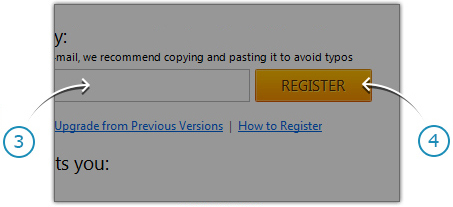
In the Registration Window, right-click inside the license code field (fig. 3) and choose Paste to enter your license code.
Press the REGISTER button (fig. 4) to complete the activation process.
Press the REGISTER button (fig. 4) to complete the activation process.
If you haven't installed BoostSpeed yet:
Install the program first and then follow the instructions above to register it. You can download BoostSpeed using this link
If you have just renewed your license:
You do not need to re-register the software or enter new license details. The program updates your subscription status once a week - you will notice the new subscription status in a few days. Please note that the program needs access to the Internet to update subscription status, so make sure your connection is active and the program is not blocked by your firewall. If the status does not update in 7 days, please contact our technical support.
Can't find your BoostSpeed Pro license code?
If you've deleted your Order Confirmation Email and can't find your BoostSpeed Pro license code, please retrieve it here.
Haven't found the answer you've been looking for?
Please feel free to contact us.